R6 Visual Controls
R6 ESP and Radar for Players, Gadgets and Drones
RageByte's R6 visual menu groups player information, radar and supported world objects into configurable layers. The public product description covers boxes, skeletons, health, distance, operator labels, gadgets and drones, with filters intended to keep the display readable during a match.
- Player boxes and skeleton overlays with configurable presentation
- Health, distance and operator information for supported targets
- Radar controls for nearby supported entities
- Gadget, drone and deployable filters to reduce visual clutter
- Team and distance controls where documented by the active build
- Saved visual configurations with per-session status checks
Confirm the current product state before each session.
Eligible orders are delivered through the customer dashboard.
Review platform and hardware requirements before checkout.
Player and operator information
Player visuals can present supported entities with boxes or skeletons and attach details such as health, distance and operator name. The user can combine only the layers needed for a particular configuration instead of enabling every label. Clear spacing and distance limits matter because excessive overlays obscure the actual game view. Supported fields may change when Ubisoft updates operators, game objects or internal data structures.
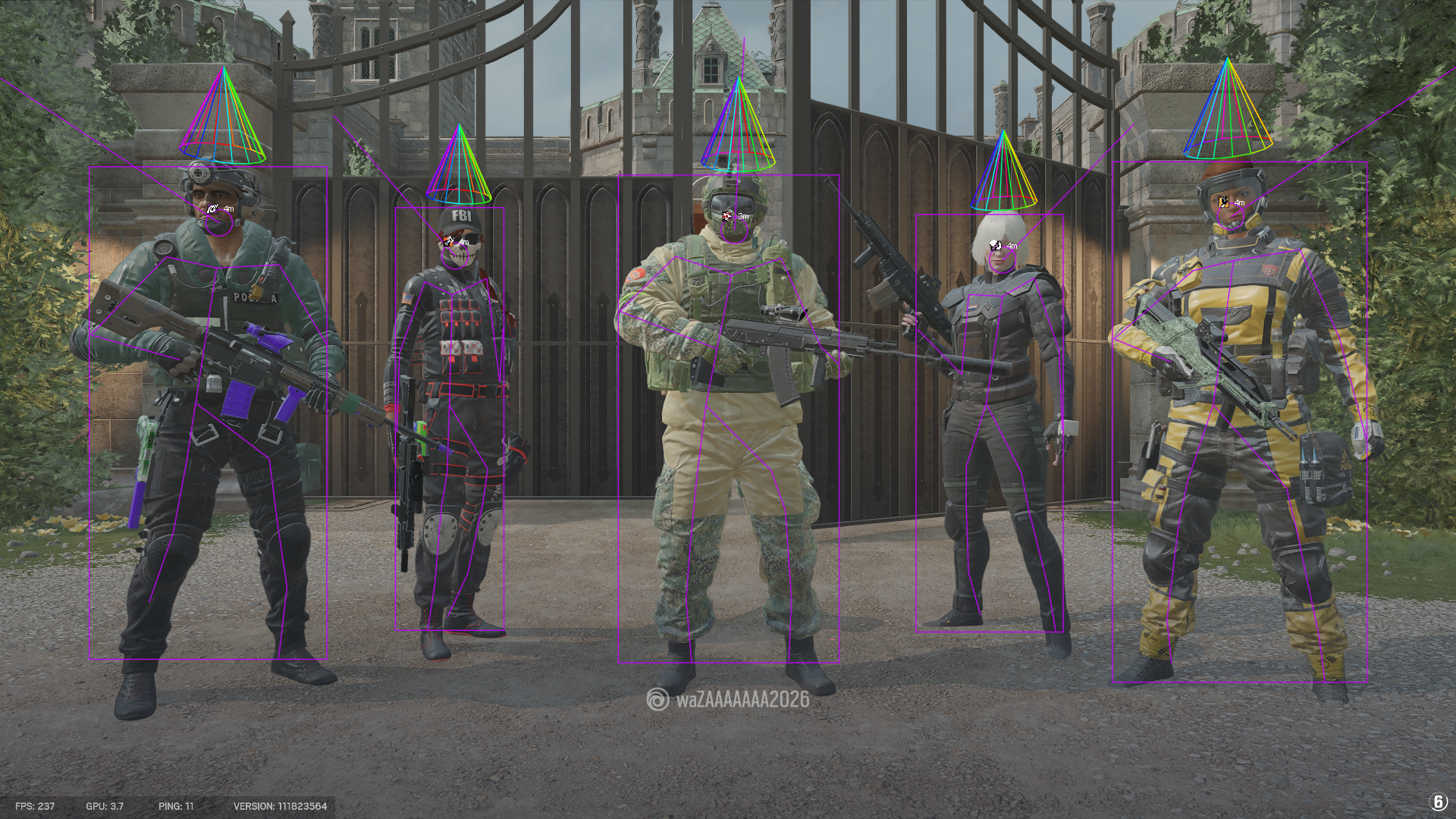
Radar, gadgets and drone filters
The radar provides a compact positional view for supported entities within its configured range. Gadget and drone filters identify documented world objects without requiring every object type to remain visible. Separating these controls makes it possible to use a simple player-only display or a more detailed information layout. The canonical product page and current media show the active menu more reliably than an older screenshot or third-party reseller description.
What visual options do not change
ESP and radar settings change the local display produced by the product; they do not alter Ubisoft servers, account standing or anti-cheat enforcement. A low-clutter configuration is not a detection bypass, and a current status result is not a future guarantee. Check the live status before every session, follow the published compatibility steps and stop using the product whenever RageByte marks it updating or unavailable.
Frequently Asked Questions
Review notes and sources
Reviewed by the RageByte product team on . This supporting page is checked against the current product page, checkout options, status information and publisher documentation. Send corrections to [email protected].
Primary reference: Ubisoft Rainbow Six Siege Player Protection. Third-party software can violate publisher rules and lead to account or hardware penalties. A status label records a current check, not a guarantee against future detection.
Before checkout, read the refund policy and privacy policy.
Explore the Rainbow Six Siege hub
Related pages covering R6 plans, aim controls and publisher protections.
Current plans, compatibility, media and live product status for Rainbow Six Siege.
How smoothing, FOV, target selection and visibility checks are configured.
A sourced overview of BattlEye, Ubisoft protections and MouseTrap.
Check the current product state before every session.
Review the current product options
Confirm compatibility, live status and purchase terms before checkout.