Call of Duty · ESP / Visuals
Call of Duty ESP — Boxes, Skeleton, Snaplines & Color Editor
The COD ESP suite covers everything you need to read a lobby: Snaplines, Skeleton, four box styles (Normal, Gradient, Filled, Corner), Health and Name tags, a dedicated Zombie ESP block and a 9-channel color editor so visible / occluded / team states each get their own tint.
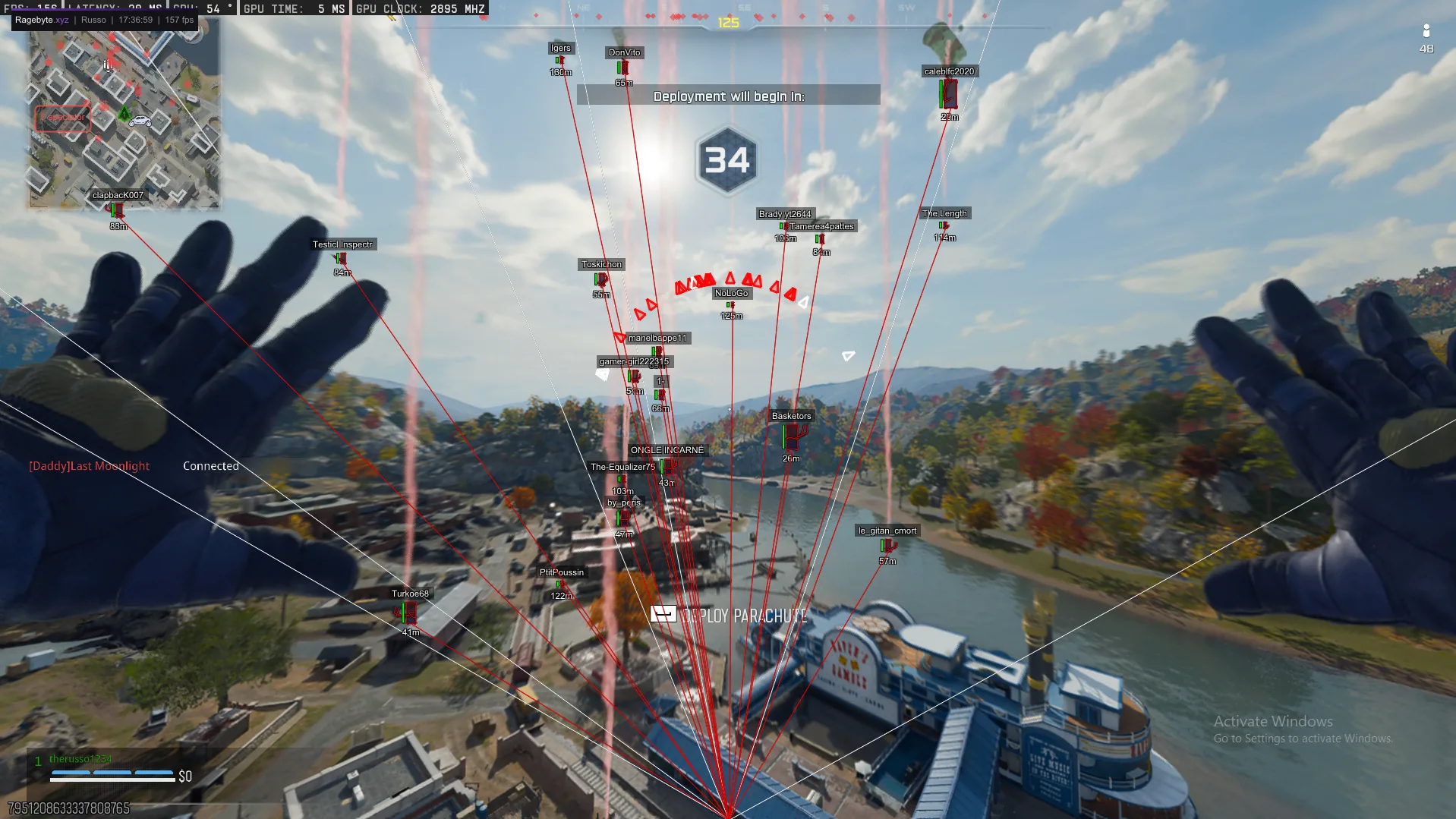
- Player ESP: Snaplines, Skeleton, Box, Gradient Box, Filled Box, Corner Box, Health, Name
- Zombie ESP: Box, Corner Box, Filled Box, Skeleton, Snapline, Health, Distance
- ESP Colors: Box, Box Top, Box Bottom, Skeleton, Snapline, Corner, Distance, Name, Visible
- Same build for Warzone, BO7 Multiplayer and Zombies
- Compass overlay: Size, Arrow Size, Arrow Fill, Compass Color, Visible Color
- Pairs with the COD aimbot's Visible Check for visible-only highlighting
Confirm the current product state before each session.
Eligible orders are delivered through the customer dashboard.
Review platform and hardware requirements before checkout.
Four box styles, one click each
Normal Box is the classic 2D rectangle around enemies, Gradient Box fades top-to-bottom for low-glare reads, Filled Box drops a translucent overlay (best for snowy or bright maps), and Corner Box gives you the cleaner CSGO-style brackets that survive against busy backgrounds. Toggle any combination — there's no single ESP profile that works for every map, so the suite is built modular.
Skeleton, snaplines and health
Skeleton ESP draws bone connections so you can tell which way an enemy is aiming before they peek. Snaplines run from a configurable origin to each player, useful for sweeping the edges of your screen. Health and Name tags float above the box with their own dedicated color channels, so a low-HP push is one glance.
Zombie ESP for BO7 Zombies
Zombies gets its own ESP block — Box, Corner Box, Filled Box, Skeleton, Snapline, Health and Distance — separate from the player ESP toggles. That way you can run a busy zombie wallhack for round 30+ camo grinding without flooding multiplayer with the same density.
Compass and color editor
The Compass overlay adds a top-of-screen direction strip with adjustable Size, Arrow Size and Arrow Fill — handy for reading flanks in BO7 small maps. Every ESP element has its own color in the ESP Colors block: Box, Box Top, Box Bottom, Skeleton, Snapline, Corner, Distance, Name and a Visible channel that highlights enemies in clear line-of-sight differently from occluded ones.
Frequently Asked Questions
Review notes and sources
Reviewed by the RageByte product team on . This supporting page is checked against the current product page, checkout options, status information and publisher documentation. Send corrections to [email protected].
Primary reference: Activision RICOCHET overview. Third-party software can violate publisher rules and lead to account or hardware penalties. A status label records a current check, not a guarantee against future detection.
Before checkout, read the refund policy and privacy policy.
Explore the Call of Duty cheat hub
Related guides on Warzone, BO7, Zombies, DMA, HWID and Ricochet bypasses.
Pricing, plans and instant key delivery for our private COD build.
Visible check, dynamic FOV, hitbox selection and controller binds for Warzone, BO7 and Zombies.
Dedicated Zombie aimbot and ESP for BO7 round-based Zombies.
See ping, platform, K/D and voice chat status for every player in your lobby.
Overlay stays invisible in OBS, Discord screenshare, clips and screenshots.
Aimbot, ESP, radar and Ricochet bypass for Call of Duty: Warzone.
Review the current product options
Confirm compatibility, live status and purchase terms before checkout.