Streamproof · Stream & Screenshare Safe
Streamproof Cheats — Your Overlay Stays Invisible on Stream, Screenshare and Screenshots
Streamproof means the cheat overlay is rendered so capture software never sees it. With Stream Proof enabled in RageByte, OBS, Twitch, Kick, YouTube, Discord screenshare, Xbox Game Bar and Windows screenshots all record a completely clean game — no ESP boxes, no snaplines, no radar, no menu — while your own monitor still shows the full overlay. The two screenshots below are the same moment in the same match: one is what a viewer captures, one is what you actually see.
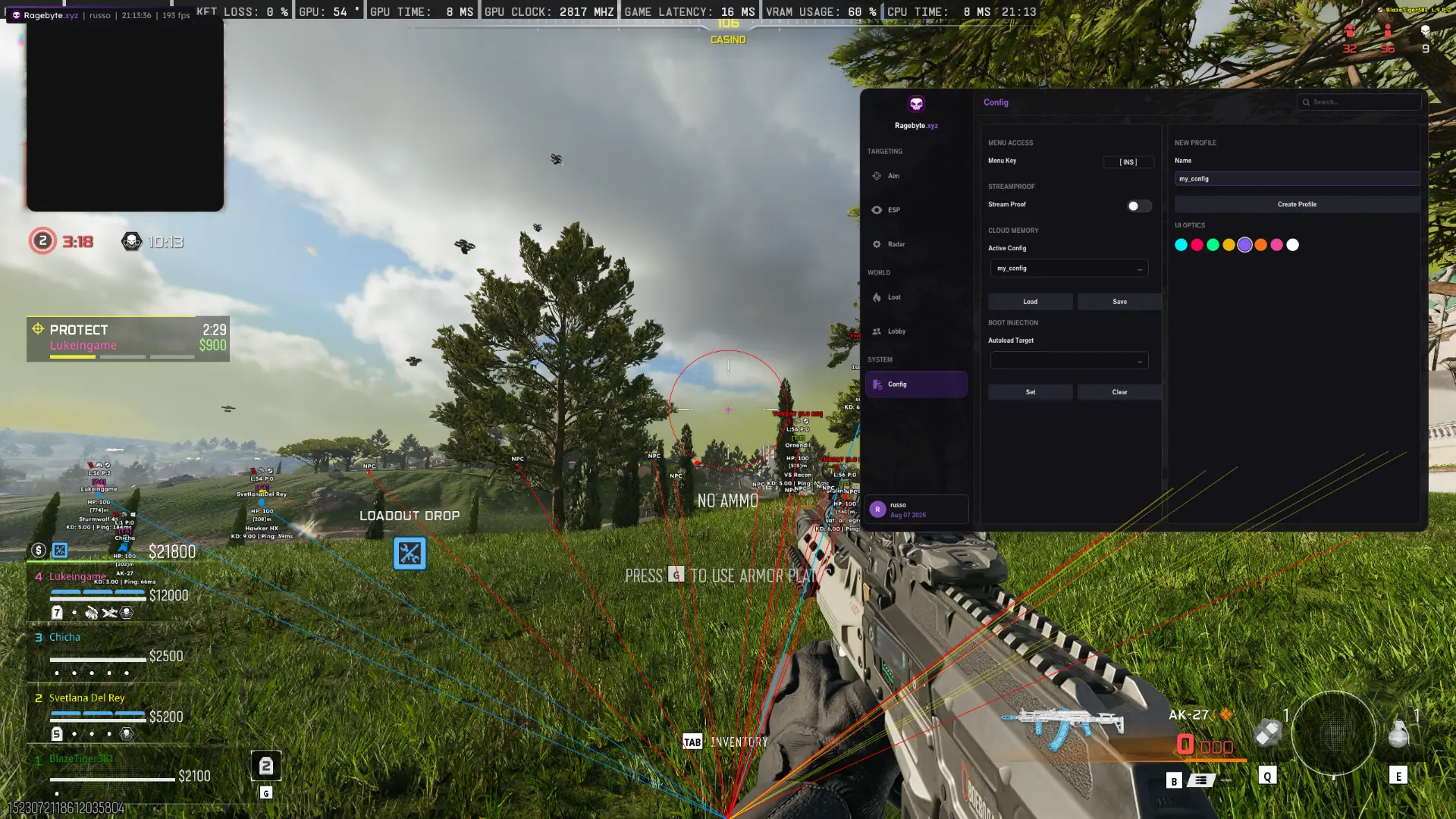
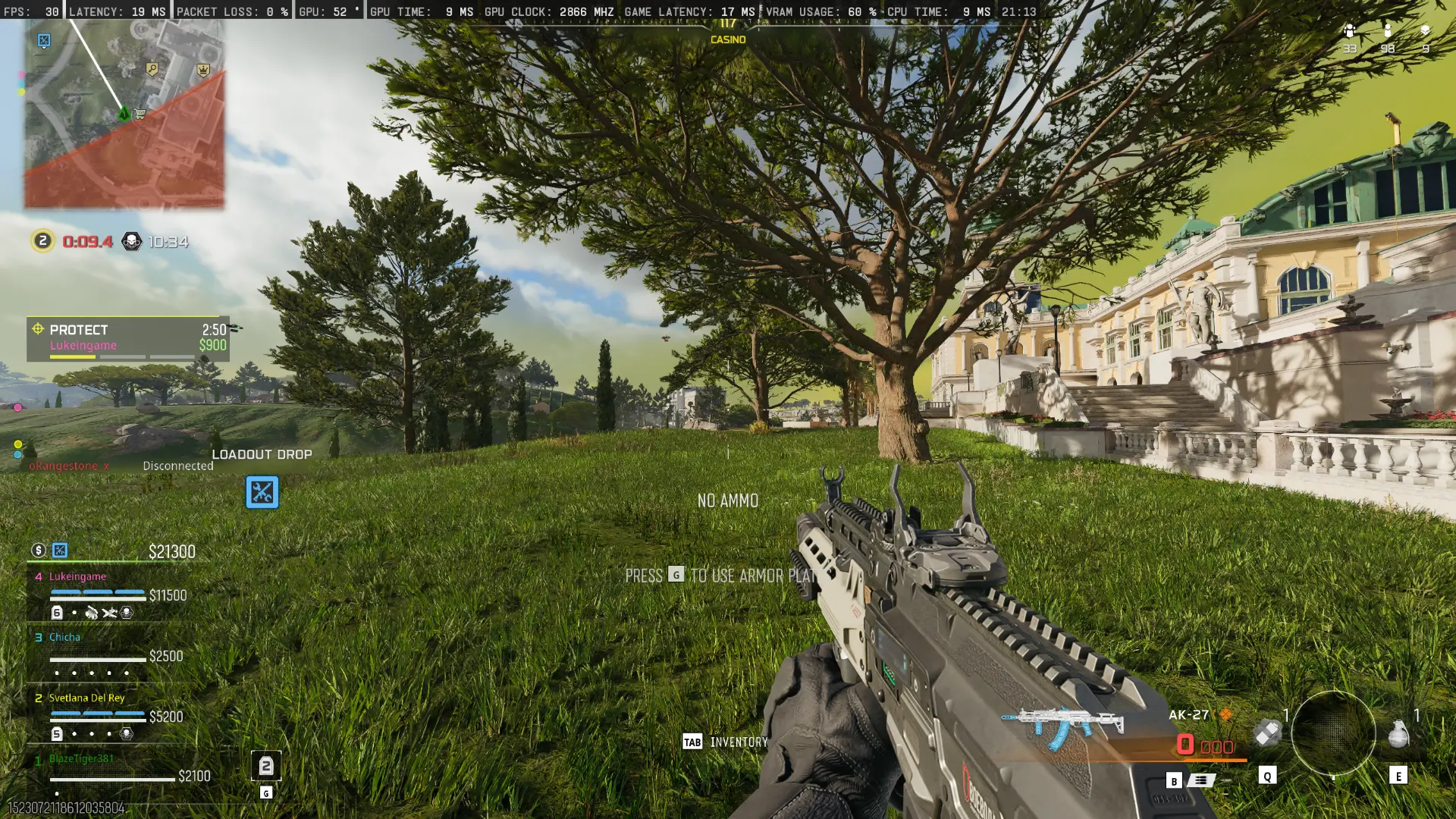
- Stream Proof toggle in the Config tab — one switch, no restart needed
- Invisible to OBS, Streamlabs, Twitch Studio, Kick, YouTube and Discord screenshare
- Invisible to Windows screenshots, Print Screen, Snipping Tool, Game Bar and ShadowPlay clips
- Menu, ESP, snaplines, radar, loot and lobby list all hidden from capture at once
- Zero visual loss on your own monitor — you still see every feature
- No FPS penalty from enabling it
- Works alongside spoofing and the Ricochet bypass, not instead of them
Confirm the current product state before each session.
Eligible orders are delivered through the customer dashboard.
Review platform and hardware requirements before checkout.
What streamproof actually means
Most overlays are drawn in a way that any screen capture API picks up, which is why a single clip can end a streamer's account. Streamproof rendering puts the RageByte overlay outside the surface that capture and screenshot software reads: OBS, Discord and Windows all grab the game frame, not your overlay layer. The result is that a viewer, a moderator, or someone you are screensharing with sees an ordinary game — even in a 4K 60fps recording, even in a frame-by-frame review of a clip.
Reading the two screenshots
Both images are the same Warzone moment, 21:13 on the same match. The first is the capture: grass, a tree, the casino building, standard HUD. Nothing else. The second is the same instant on the user's own screen — enemy and NPC boxes with HP, K/D and ping, coloured snaplines converging on the player, name tags at distance, the radar, and the RageByte menu open on the Config tab with Stream Proof active. Neither the overlay nor the menu makes it into the capture.
Why streamers need it
Streaming with a cheat is a two-front problem: the anti-cheat, and the audience. Clips are the bigger risk, because they are permanent, shared, and reviewed frame by frame by people who know what ESP looks like. Streamproof removes that surface entirely — accidental alt-tabs into the menu, a moment where snaplines converge on a wall, an over-perfect flick with a visible box: none of it exists in the recording. It is also the reason content creators can keep VODs public without curating every clip.
Screenshare, coaching and Game Bar
The same protection covers Discord screenshare (both window and full-screen capture), Xbox Game Bar recordings, NVIDIA ShadowPlay and AMD ReLive instant replays, Steam screenshots, and the Windows Snipping Tool. That matters for people who screenshare casually with friends, submit clips for support tickets, or record VODs for coaching — the recording is safe by default rather than by remembering to close the menu.
How to enable Stream Proof
Open the menu with the Insert key, go to the Config tab under SYSTEM, and switch on Stream Proof under STREAMPROOF. It applies instantly and can be saved into a profile with Save so it is on every session. Verify it once before your first stream: start a local OBS recording, open the menu, play for a few seconds, then watch the recording back — the overlay should be completely absent.
What streamproof does not do
Streamproof is a capture-visibility feature, not a bypass. It hides the overlay from recording software; it does not hide your gameplay from human suspicion, and it is not what keeps the build undetected — that is the Ricochet bypass, HWID spoofing and the loader's injection flow. Play believably on stream, and check the live status on /status before you go live.
Frequently Asked Questions
Review notes and sources
Reviewed by the RageByte product team on . This supporting page is checked against the current product page, checkout options, status information and publisher documentation. Send corrections to [email protected].
Primary reference: Activision RICOCHET overview. Third-party software can violate publisher rules and lead to account or hardware penalties. A status label records a current check, not a guarantee against future detection.
Before checkout, read the refund policy and privacy policy.
Explore the Call of Duty cheat hub
Related guides on Warzone, BO7, Zombies, DMA, HWID and Ricochet bypasses.
Pricing, plans and instant key delivery for our private COD build.
Visible check, dynamic FOV, hitbox selection and controller binds for Warzone, BO7 and Zombies.
Boxes, skeleton, snaplines, health, name and a 9-channel color editor.
Dedicated Zombie aimbot and ESP for BO7 round-based Zombies.
See ping, platform, K/D and voice chat status for every player in your lobby.
Aimbot, ESP, radar and Ricochet bypass for Call of Duty: Warzone.
Review the current product options
Confirm compatibility, live status and purchase terms before checkout.