Call of Duty · Lobby / Session Roster
COD Lobby Player List — See Ping, Platform, Voice Chat & Team Before You Drop
The Lobby tab in the RageByte Call of Duty menu lists every player in your match with their team, rank, weapon, ping, K/D, platform, XUID, in-game state and whether they are in voice chat. It turns a blind lobby into readable information: who lags, who is on console, which squads are coordinating and how many of those names are actually bots.
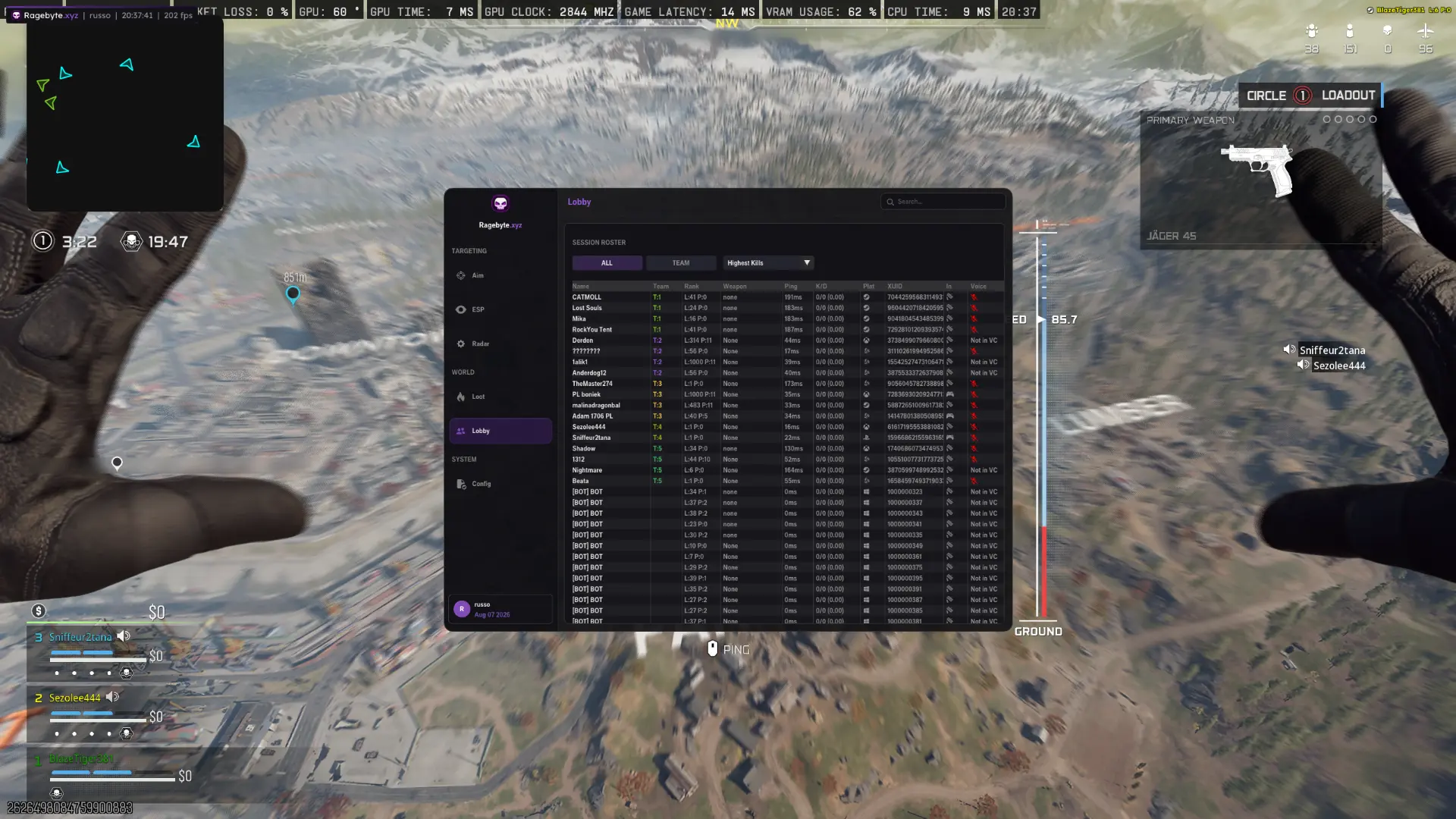
- Session Roster with Name, Team, Rank, Weapon, Ping, K/D, Platform, XUID, In-game and Voice columns
- ALL and TEAM filters to isolate your squad or the whole lobby
- Sort by Highest Kills to surface the real threats first
- Ping column per player — spot laggy peekers and bad-connection lobbies
- Platform icons — console vs PC vs bot entries at a glance
- Voice status ('Not in VC') shows which squads are actually communicating
- Bot entries ([BOT] BOT, 0ms ping) expose filler lobbies instantly
Confirm the current product state before each session.
Eligible orders are delivered through the customer dashboard.
Review platform and hardware requirements before checkout.
Why the lobby list matters more than the killfeed
Call of Duty gives you almost nothing before a match starts — no scoreboard, no ping list, no platform breakdown. The RageByte Lobby tab fills that gap: it reads the session roster and shows you every player with their team number, level, ping, K/D and platform before the first engagement. Knowing that four names in your lobby are level 1000 with sub-20ms ping changes how you rotate, and knowing that half the roster is bots means you can push aggressively instead of playing corners.
Ping: who wins the peek before you even shoot
Each player's ping is listed in milliseconds. A 180ms opponent will appear around corners later on their screen than yours, which is exactly why some trades feel impossible — you were already visible to them for two frames before you saw them. Reading ping per player tells you who you should never peek wide against, who is close enough to your latency for a fair fight, and whether the whole lobby is on a bad server worth backing out of.
Platform column: console, PC, or bot lobby
The Platform column shows the input ecosystem each player is on. That matters because controller aim assist behaves nothing like mouse aim: console-heavy lobbies fight closer and hold angles, PC-heavy lobbies rotate faster and pre-fire more. In the roster, bot entries show as [BOT] BOT with 0ms ping and sequential XUIDs, so you can tell a genuine full lobby from a bot-padded one in about a second — useful for camo grinds and challenge farming where a soft lobby is the goal.
Voice chat status: which squads are coordinating
The Voice column flags players as in voice chat or 'Not in VC'. A full team in voice chat will trade, res and pinch you; four solos who are not in voice will fight you one at a time. That single detail decides whether you third-party a fight or wait for it to end, and it is the reason experienced players check the roster before committing to a push on a full squad.
Rank, K/D and weapon — reading real threats
Rank/level plus K/D gives you a rough skill read per player, and the Weapon column shows what they are currently holding. Sorting by Highest Kills pushes the dangerous players to the top of the list, so instead of treating twelve names as equal risks, you know which two to avoid and which eight are free. Combine it with the Team column and you can predict how a lobby will collapse in the last circles.
Is reading the lobby safe?
The Lobby tab is read-only — it renders the session information your client already receives, drawn in the RageByte overlay on your machine, and it does not touch inputs or aim. It runs under the same Ricochet bypass as the rest of the build, and because nothing is written back to the game, it is the lowest-noise feature in the menu. Live undetected status for the COD build is always published on /status before a session.
Frequently Asked Questions
Review notes and sources
Reviewed by the RageByte product team on . This supporting page is checked against the current product page, checkout options, status information and publisher documentation. Send corrections to [email protected].
Primary reference: Activision RICOCHET overview. Third-party software can violate publisher rules and lead to account or hardware penalties. A status label records a current check, not a guarantee against future detection.
Before checkout, read the refund policy and privacy policy.
Explore the Call of Duty cheat hub
Related guides on Warzone, BO7, Zombies, DMA, HWID and Ricochet bypasses.
Pricing, plans and instant key delivery for our private COD build.
Visible check, dynamic FOV, hitbox selection and controller binds for Warzone, BO7 and Zombies.
Boxes, skeleton, snaplines, health, name and a 9-channel color editor.
Dedicated Zombie aimbot and ESP for BO7 round-based Zombies.
Overlay stays invisible in OBS, Discord screenshare, clips and screenshots.
Aimbot, ESP, radar and Ricochet bypass for Call of Duty: Warzone.
Review the current product options
Confirm compatibility, live status and purchase terms before checkout.